
Introduction
The Microsoft Surface Go Review is a compact and versatile 2-in-1 device designed to deliver the power of a Windows laptop in the form of a lightweight tablet. With its sleek design, touchscreen display, and full Windows operating system, the Surface Go aims to provide a balanced experience for users who need portability without sacrificing productivity. It stands out as one of the most affordable devices in Microsoft’s Surface lineup.
The Surface Go has gained popularity among students and professionals because of its portability, premium build quality, and ability to run full desktop applications like Microsoft Word, Excel, and PowerPoint. Students appreciate it for note-taking, online classes, and assignments, while professionals value its flexibility for emails, presentations, remote work, and travel-friendly productivity.
What Is the Microsoft Surface Go?
The Microsoft Surface Go is a 2-in-1 Windows device that works as both a tablet and a laptop. It is part of Microsoft’s Surface family and is designed for users who want a portable, lightweight device for everyday tasks. Unlike Android tablets or iPads, the Surface Go runs full Windows, which means you can install and use regular desktop software just like on a laptop.
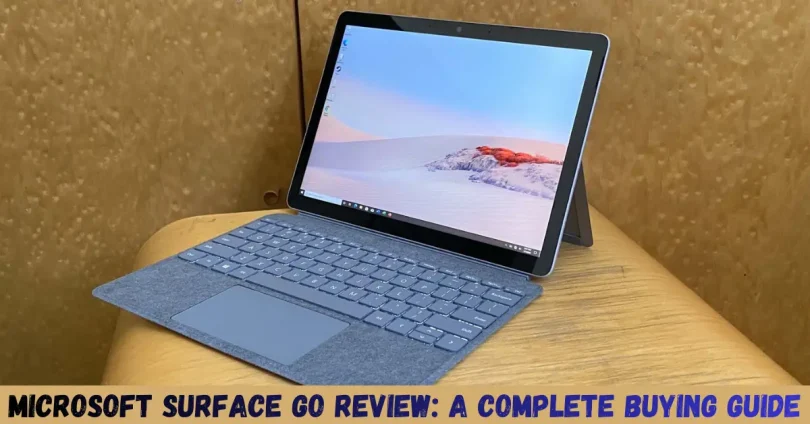
The device comes with a 10.5-inch PixelSense touchscreen display and supports accessories such as the Surface Type Cover keyboard and Surface Pen. When attached to the keyboard, it functions like a mini laptop. When detached, it becomes a tablet, making it flexible for different usage styles.
Design and Build Quality

The Microsoft Surface Go features a clean, modern design that reflects Microsoft’s premium Surface lineup. It is built with a magnesium alloy body, which gives the device a solid and high-quality feel while keeping it lightweight and easy to carry. The slim profile makes it comfortable to hold as a tablet and convenient to slip into a backpack or handbag.
One of the standout design features is the built-in adjustable kickstand. It allows you to position the device at multiple angles, making it suitable for typing, watching videos, drawing with the Surface Pen, or video calls. This flexibility makes the Surface Go practical for both work and entertainment.
Despite its compact size, the Surface Go feels durable and well-constructed. The buttons, ports, and edges are neatly placed, and the overall finish gives it a professional look. Whether you’re a student attending online classes or a professional working on the move, the Surface Go’s design balances portability, durability, and style very well.
Display Quality
The Microsoft Surface Go comes with a 10.5-inch PixelSense touchscreen display, which is one of its strongest features. The screen offers a sharp resolution and delivers clear text and vibrant colors, making it comfortable for reading, browsing, and watching videos. For a device of its size, the display quality feels premium and well-suited for both work and entertainment.
The touchscreen is responsive and smooth, allowing users to easily navigate Windows, scroll through webpages, and use apps with touch gestures. It also supports the Surface Pen, which is especially useful for students who take digital notes or professionals who like to sketch, annotate documents, or sign files directly on the screen.
Brightness levels are good enough for indoor use and moderate outdoor conditions. Whether you are attending online classes, working on documents, or streaming content, the Surface Go’s display delivers a comfortable and visually pleasing experience without straining the eyes.
Performance and Hardware

The Microsoft Surface Go is designed for everyday productivity rather than heavy performance tasks. Depending on the model, it is powered by Intel Pentium or Intel Core i3 processors, paired with different RAM and storage options. These specifications make it suitable for light to moderate usage such as web browsing, online classes, email management, document editing, and video streaming.
In real-world use, the Surface Go handles common tasks smoothly when used for basic work. Applications like Microsoft Word, Excel, PowerPoint, Google Chrome, Zoom, and Microsoft Teams run without major issues. However, when multiple apps are open at the same time, performance can slow down, especially on lower RAM variants.
Storage options typically include eMMC or SSD, depending on the configuration. While the SSD models offer faster performance, users with basic models may notice slower load times. Thankfully, the microSD card slot allows for easy storage expansion.
Battery Life
Battery life on the Microsoft Surface Go is decent for a compact 2-in-1 device, but it depends largely on how you use it. Microsoft claims all-day battery performance, but in real-world usage, the Surface Go typically delivers 5 to 7 hours of mixed use. This includes web browsing, document editing, online classes, and video streaming at moderate brightness.
For light tasks such as reading documents, typing notes, or checking emails, the battery lasts longer. However, activities like video calls, multitasking, or streaming in high resolution can drain the battery more quickly. This means heavy users may need to carry a charger if they plan to use the device for extended periods.
The Surface Go charges through the Surface Connect port and also supports USB-C charging, which adds convenience when traveling. Overall, the battery performance is acceptable for students and professionals who need short to moderate work sessions, but it may not be ideal for a full day of heavy use without recharging.
Keyboard, Stylus, and Accessories
The Microsoft Surface Go becomes a true laptop alternative only when paired with its accessories. The most important one is the Surface Type Cover keyboard, which is sold separately. The keyboard is slim, lightweight, and easy to attach, offering a comfortable typing experience despite the device’s compact size. The keys are responsive and suitable for writing assignments, emails, and blog posts.
The device also supports the Surface Pen, making it a great option for note-taking, drawing, and document annotation. Students and creative users will especially appreciate the pen’s accuracy and pressure sensitivity. However, like the keyboard, the Surface Pen is also an additional purchase.
Other accessories include a mouse, USB-C hub, and protective case, which can further enhance usability. While these accessories significantly improve the overall experience, they also increase the total cost of the Surface Go. Buyers should keep this in mind when considering the device’s value for money.
Connectivity and Ports
The Microsoft Surface Go offers a simple but practical selection of ports to support everyday connectivity needs. It includes a USB-C port, which can be used for charging, data transfer, and connecting external displays. This makes it convenient for users who want a single cable solution for multiple tasks.
In addition to USB-C, the Surface Go features a Surface Connect port for charging with Microsoft’s official charger, a 3.5mm headphone jack, and a microSD card reader for storage expansion. The microSD slot is especially useful for students and professionals who need extra space for files, documents, and media.
Some models of the Surface Go also come with LTE connectivity, allowing users to access the internet without relying on Wi-Fi. This is particularly beneficial for travelers and remote workers. While the number of ports is limited compared to traditional laptops, it is sufficient for a compact 2-in-1 device focused on portability.
Connectivity and Ports
The Microsoft Surface Go offers a simple but practical selection of ports to support everyday connectivity needs. It includes a USB-C port, which can be used for charging, data transfer, and connecting external displays. This makes it convenient for users who want a single cable solution for multiple tasks.
In addition to USB-C, the Surface Go features a Surface Connect port for charging with Microsoft’s official charger, a 3.5mm headphone jack, and a microSD card reader for storage expansion. The microSD slot is especially useful for students and professionals who need extra space for files, documents, and media.
Some models of the Surface Go also come with LTE connectivity, allowing users to access the internet without relying on Wi-Fi. This is particularly beneficial for travelers and remote workers. While the number of ports is limited compared to traditional laptops, it is sufficient for a compact 2-in-1 device focused on portability.
Pros and Cons
Pros
- Portable and lightweight design, easy to carry anywhere
- Premium build quality with a sturdy metal body
- Full Windows operating system, supports desktop applications
- Responsive touchscreen with Surface Pen support
- Expandable storage via microSD card
- Optional LTE connectivity on select models
Cons
- Limited performance for heavy tasks and multitasking
- Keyboard and Surface Pen sold separately, increasing total cost
- Average battery life compared to some competitors
- Limited number of ports
- Not suitable for gaming or demanding professional work
Who Should Buy the Microsoft Surface Go?
The Microsoft Surface Go is a great choice for users who need a portable and flexible Windows device for everyday tasks. It is especially suitable for:
- Students who need a lightweight device for online classes, note-taking, assignments, and research
- Office workers and professionals who handle emails, documents, presentations, and virtual meetings
- Travelers and remote workers who want a compact device for work on the go
- Casual users who mainly browse the web, stream videos, and use productivity apps
If your daily tasks involve light to moderate usage and you value portability, the Surface Go can be a reliable companion.
Who Should Not Buy the Microsoft Surface Go?
Despite its versatility, the Surface Go is not for everyone. It may not be the right choice if you are:
- A gamer looking for high graphics performance
- A video editor or graphic designer working with heavy software
- A power user who needs fast multitasking and high processing power
- Someone who wants a budget laptop with accessories included
In such cases, a full-sized laptop or a higher-end Surface model would be a better option.
Final Verdict
The Microsoft Surface Go is a well-designed and versatile 2-in-1 device that delivers a full Windows experience in a compact and lightweight form. It shines in portability, build quality, and everyday productivity, making it an excellent option for students and professionals with light computing needs.
However, its limited performance and the extra cost of accessories mean it’s important to understand your requirements before buying. If you’re looking for a portable Windows device for basic tasks and productivity on the move, the Microsoft Surface Go is definitely worth considering.
Frequently Asked Questions (FAQs)
Is Microsoft Surface Go good for students?
Yes, the Microsoft Surface Go is a good option for students. It is lightweight, portable, and supports Microsoft Office, online classes, note-taking, and web browsing.
Can Microsoft Surface Go replace a laptop?
The Surface Go can replace a laptop for light tasks like typing documents, emails, and browsing. However, it is not suitable for heavy multitasking or professional software.
Does Microsoft Surface Go run full Windows?
Yes, Microsoft Surface Go runs the full version of Windows, allowing users to install and use regular desktop applications just like on a laptop.
Is the keyboard included with Microsoft Surface Go?
No, the Surface Type Cover keyboard is sold separately. You need to buy it separately to use the device in laptop mode.
Is Microsoft Surface Go good for gaming?
No, the Surface Go is not designed for gaming. It can handle very light games, but high-end or graphics-intensive games will not run smoothly.
How long does the battery last on Microsoft Surface Go?
The battery usually lasts around 5 to 7 hours with normal usage such as browsing, document editing, and video streaming.
Does Microsoft Surface Go support a stylus?
Yes, the Surface Go supports the Surface Pen, which is useful for note-taking, drawing, and document annotation.
Who should buy Microsoft Surface Go?
Microsoft Surface Go is ideal for students, office workers, travelers, and casual users who need a portable Windows device for everyday tasks.